

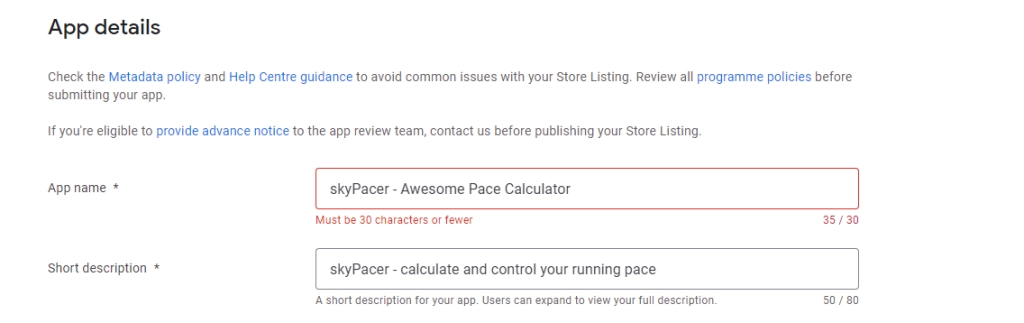
Besides some other changes, Google has changed the app title lengths within the Google Play Console.
In the past, you could enter titles up to a length of 50 characters. Now, only 30 characters are allowed in total. Google will enforce this change as soon as you create new apps or update existing ones.
As an app publisher, you have to shorten all titles for all languages of all apps if they exceed the new limit.
Of course, this is a time-consuming task if you have maintained more than one language, as navigating within the Google Play Console is far from intuitive and UX optimized.
Only a few steps to update titles
You can significantly improve this process and speed up things with a few steps. As an existing App Store Manager user, it is even less.
- Login to the App Store Manager.
The features which are required are available in the free plan. Therefore no payment, credit card, or other is necessary. - Create your existing app representation quickly through the store search.
- Enter your app’s title and select it from the search result.
- Then, configure a new description package and import your existing app store presence texts.
You will require a Google Play API key for that.
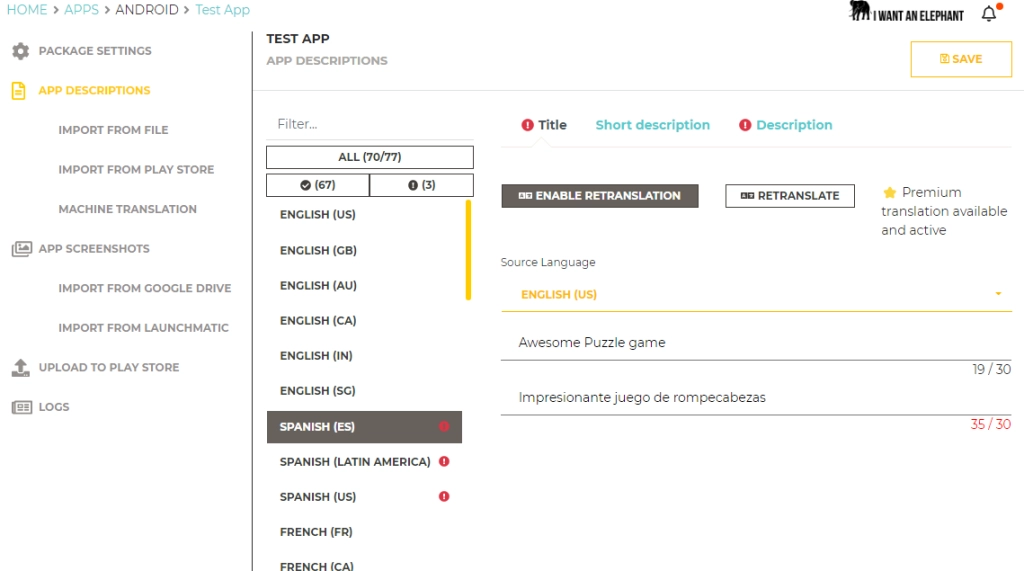
The App Store Manager will show you for which languages the title lengths exceed the 30 character minimum. - Just filter accordingly and start modifying from there. Then, edit, retranslate, and upload everything with just a click as soon as you are happy.
- Use the App Store Manager for free to adapt Google’s changes instantly.
Conclusion
Stores keep changing their policies and requirements. For app publishers and developers, this remains challenging. Of course, changes always offer new opportunities and possibilities. But at the same time, thy result often in a lot of work. Therefore, it makes sense to rely on proven and well-known tools. On the one hand, this makes the work more straightforward, and on the other hand, it saves time and, of course, money.