
You've spent months building your app. The code works, the design is polished, and you're almost ready to ship. Then comes the question that stops surprisingly many developers in their tracks: what do you call it?
Your app name is the first thing users see. It appears in search results, on the home screen, in every review, and in every recommendation. A bad name is hard to find, hard to remember, and can even get you into legal trouble. A good name does half the marketing work for you.
We've been through this process dozens of times ourselves, and we've seen hundreds of developers struggle with it. Here's the practical, step-by-step process we recommend.
Step 1: Brainstorm with constraints in mind
Before you fall in love with a name, know the rules:
- Apple App Store allows a maximum of 30 characters for the app name
- Google Play Store also limits the title to 30 characters
- Both stores have policies against keyword stuffing in names
- Special characters and emoji are either restricted or discouraged
This means "SuperAmazingFitnessTracker Pro - Best Workout App 2026" is out. Keep it short, memorable, and pronounceable. If someone can't say it out loud or spell it after hearing it once, it's going to be a problem.
A few approaches that tend to work well:
- Descriptive names — tell users what the app does: "Sleep Cycle", "Pocket Casts"
- Invented words — unique and ownable: "Spotify", "Shazam"
- Compound words — combine two familiar concepts: "Headspace", "Grammarly"
- Real words with a twist — existing words in a new context: "Slack", "Notion"
Write down 10 to 20 candidates. Don't filter yet. The filtering comes next, and it's more important than the brainstorming.
Step 2: Check the app stores
This is where most developers start — and for good reason. If there's already an app with the same name in your category, you have a problem. Even if it's in a different category, users will confuse you with them, and your ASO will suffer.
You need to check both stores. An app name might be clear on Google Play but taken on the App Store, or vice versa. If you plan to launch on both platforms (and most apps eventually do), check both from the start.
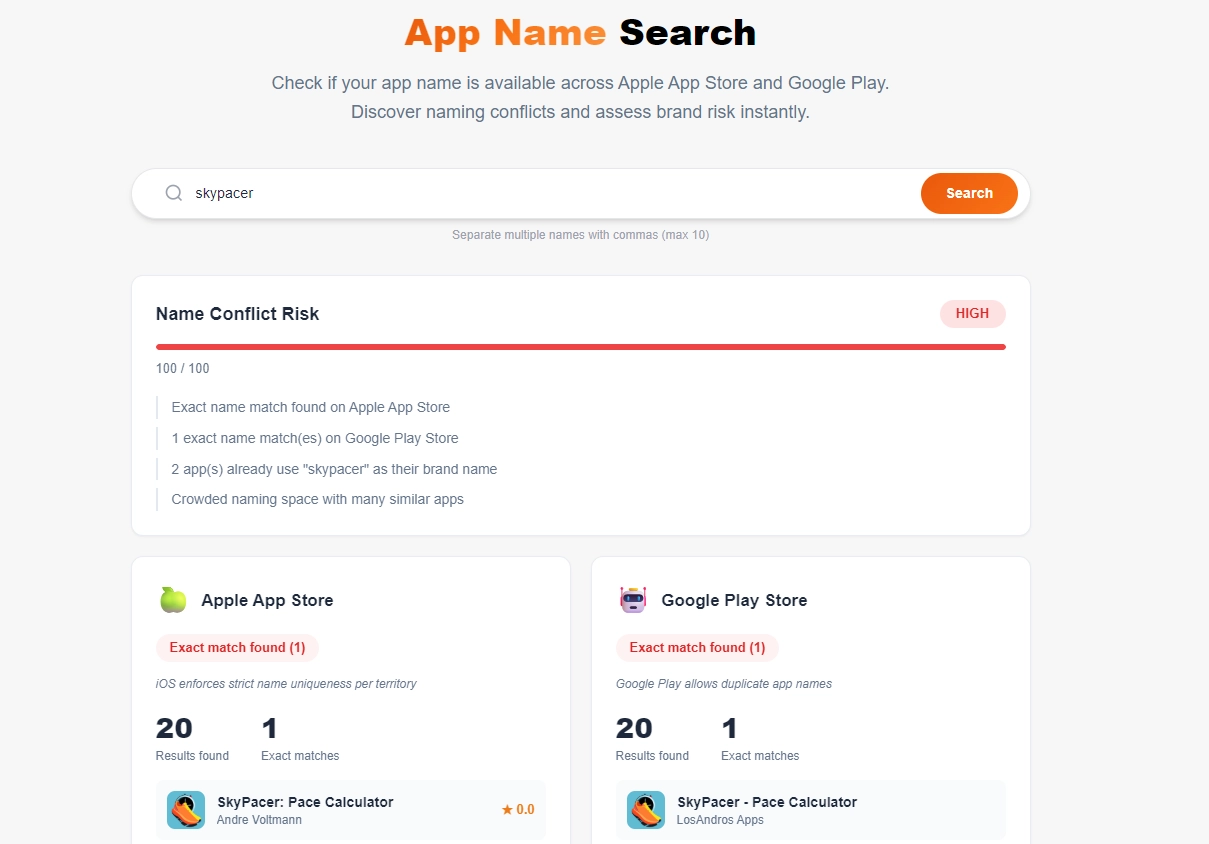
We built a free App Name Search tool specifically for this. Enter your proposed name, and it searches both Apple App Store and Google Play simultaneously. It doesn't just check for exact matches — it also finds similar names and gives you a conflict risk score so you can assess how crowded the namespace is.
What to look for:
- Exact matches — another app with the identical name. This is a red flag, especially if it's in the same category.
- Similar names — apps with names close enough to cause confusion. "FitTrack" vs "FitTrak" vs "Fit Track" will all compete for the same search terms.
- Category overlap — a matching name in a completely unrelated category (like a game vs a productivity app) is less of a concern, but still worth noting.
- Developer size — if the existing app with that name has millions of downloads, you're fighting a losing battle. If it's an abandoned app with 12 downloads from 2019, the risk is lower.
Step 3: Check trademarks and brand rights
This is the step most indie developers skip — and the one that can cost you the most. Getting a takedown notice or a cease-and-desist letter six months after launch, when you've already built brand recognition, is painful and expensive.
Here's what to check:
Trademark databases
Search the major trademark registries for your target markets:
- United States: USPTO Trademark Search (TESS)
- European Union: EUIPO eSearch plus
- International: WIPO Global Brand Database
- United Kingdom: UK IPO Trademark Search
Search for your exact name and common variations. Pay attention to the Nice Classification — trademarks are registered in specific classes, and Class 9 (software, apps) and Class 42 (SaaS, technology services) are the ones most relevant to app developers.
A trademark registered for clothing in Class 25 probably won't affect your app. But a trademark for software in Class 9 with a similar name? That's a real problem.
Domain and social media
While you're at it, check whether the domain name and social media handles are available:
- Is
yourappname.com(or.app,.io) available? - Can you get
@yourappnameon X/Twitter, Instagram, and TikTok? - Is there a subreddit, Discord server, or YouTube channel with that name?
You don't necessarily need all of these, but if the .com domain is taken by a competitor in your space, that's a signal the name might be too crowded.
Step 4: Google it
This sounds basic, but it catches things the other steps miss. Search for your proposed app name on Google and look at the first two pages of results.
- Is the name a common word or phrase that will be impossible to rank for? ("Timer", "Notes", "Weather")
- Does the name have an unintended meaning in another language or culture?
- Is there a company, product, or public figure with that name?
- Are there any negative associations? (A brand name that's also slang for something unfortunate in another language is a real risk for global apps.)
Also try Google Image Search with your name. If the results are dominated by a well-known brand's logos and products, your app will struggle to establish its own visual identity in search.
Step 5: Think about ASO from day one
Your app name is one of the strongest ranking signals in both app stores. Apple and Google both weigh the title heavily in search algorithms. This means your name is not just branding — it's SEO.
A few principles:
- Include a keyword if it fits naturally. "Headspace: Meditation & Sleep" tells both users and algorithms what the app does. But don't force it — "MeditationSleepRelaxApp" is terrible.
- Use the subtitle/short description wisely. Apple gives you a 30-character subtitle and Google gives you an 80-character short description. Use these to add keywords that don't fit in the name.
- Don't change your name frequently. App store algorithms need time to associate your name with search terms. Changing it every few weeks resets your ranking.
Step 6: Test it with real people
Before you commit, do something low-tech but effective: tell five people your app name and ask them to spell it back to you the next day. If they can't remember it or keep misspelling it, that's valuable data.
Also say it out loud in a sentence: "Have you tried [app name]?" Does it sound natural? Is it easy to pronounce? Can you imagine a friend recommending it in conversation?
The checklist
Before you commit to a name, make sure you can check every box:
- 30 characters or fewer
- Easy to spell and pronounce
- No exact match on Apple App Store or Google Play
- No high-risk similar names in your category
- No active trademark in Class 9 or 42
- Domain name available (or at least not owned by a competitor)
- No embarrassing meanings in other languages
- Google results are not dominated by an existing brand
- Includes a relevant keyword (if it fits naturally)
- Passes the "tell a friend" test
Try it yourself
We built the App Name Search tool because we needed it ourselves. Every time we start a new project — like when we built Jumpin' Elephant — the first thing we do is check whether the name is available across both stores.
The tool is completely free, requires no sign-up, and checks both Apple App Store and Google Play in one search. It gives you exact match detection, fuzzy similarity analysis, and a conflict risk score for each name you try. You can even search multiple names at once by separating them with commas.
Finding the right name takes more effort than most developers expect. But it's one of those decisions where spending an extra day upfront saves you months of headaches later. Good luck naming your app.